 Sound map & ambience studio

Find real field recordings on a world map and mix them into calm, editable soundscapes.
Launch Soundscape Atlas → Tutorials
Soundscape Atlas puts freely licensed field recordings from Wikimedia Commons on an offline world map — birdsong, rain, rivers, streets and machines, each with its licence, author and source. Mix them with generated rain, wind, water, fire, hum, drone and noise layers into an ambience scene with fades, slow automation, room reverb and a sleep timer, then export a WAV, a credits file or an editable scene. Nothing plays until you press Play.
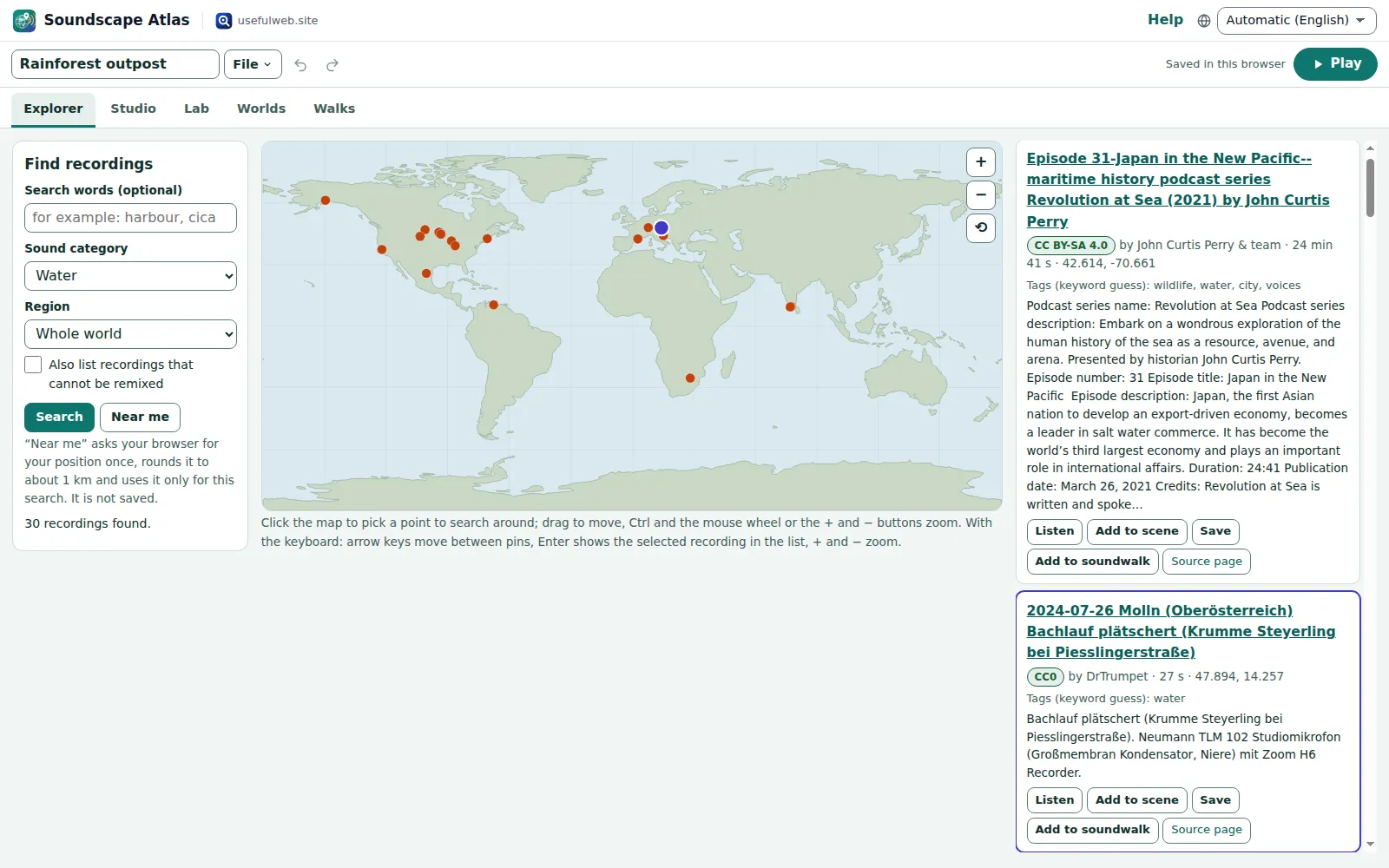
Screenshots
- Real recordings on an offline world map
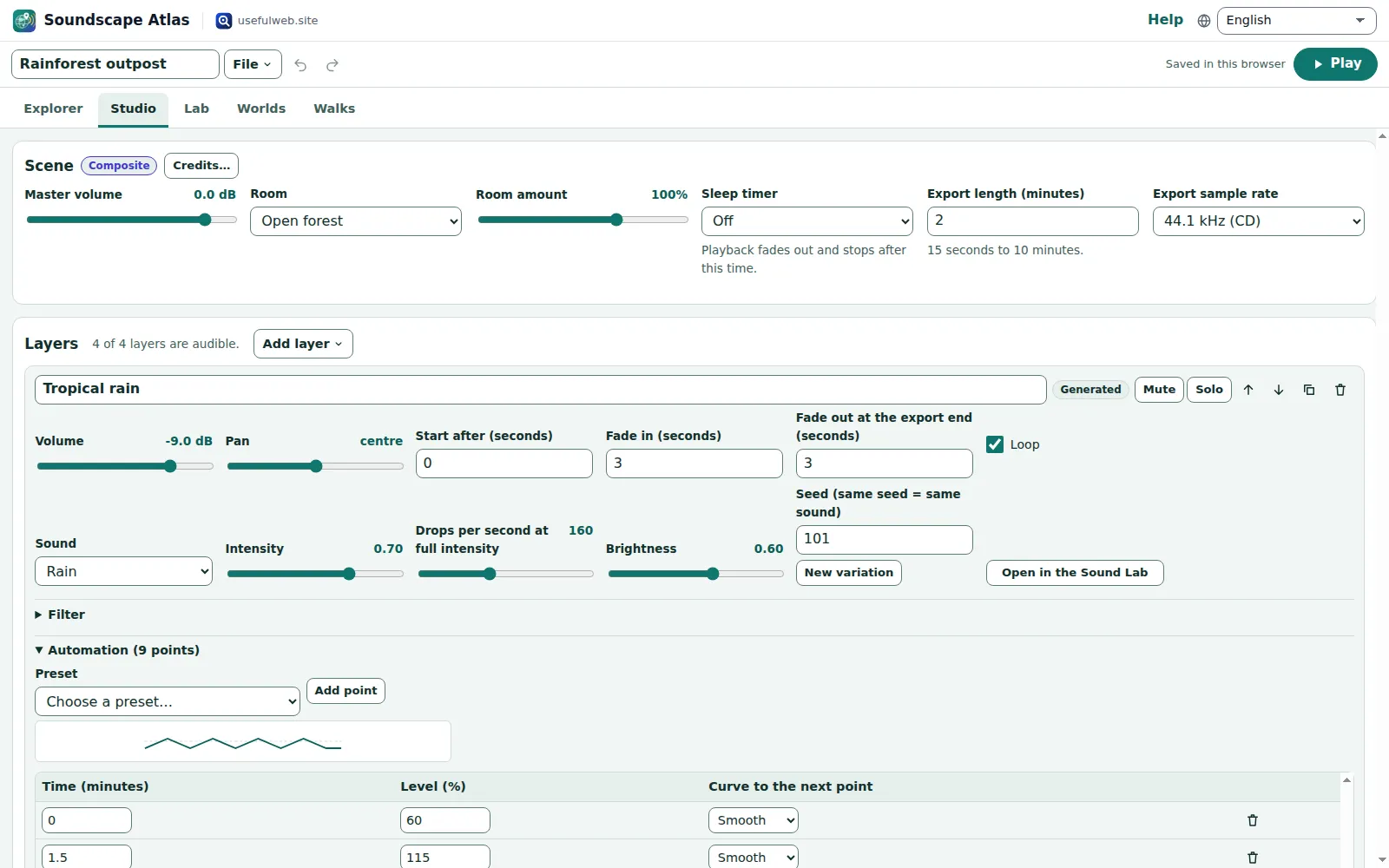 Mix recordings and generated layers
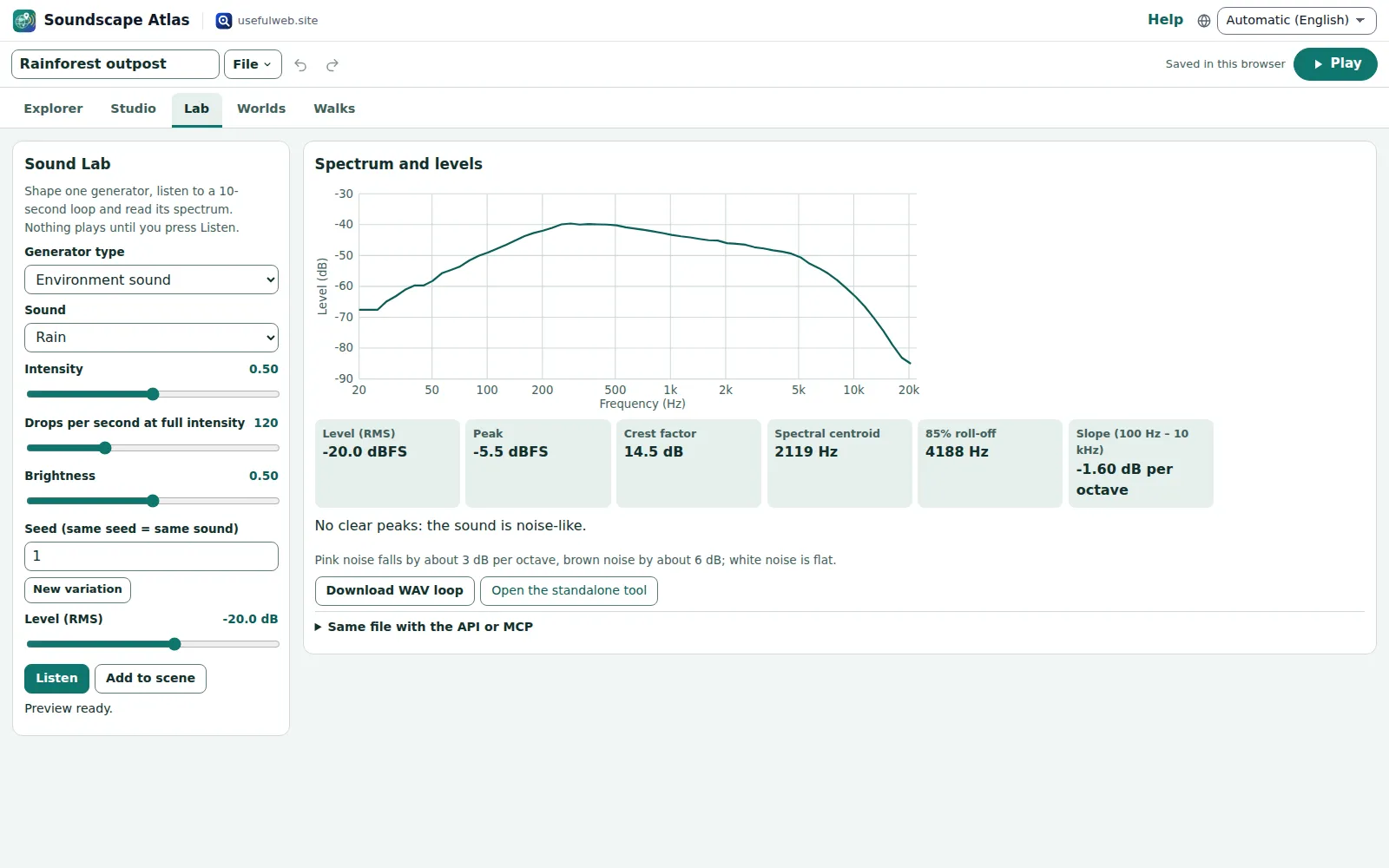 Shape a generator and read its spectrum
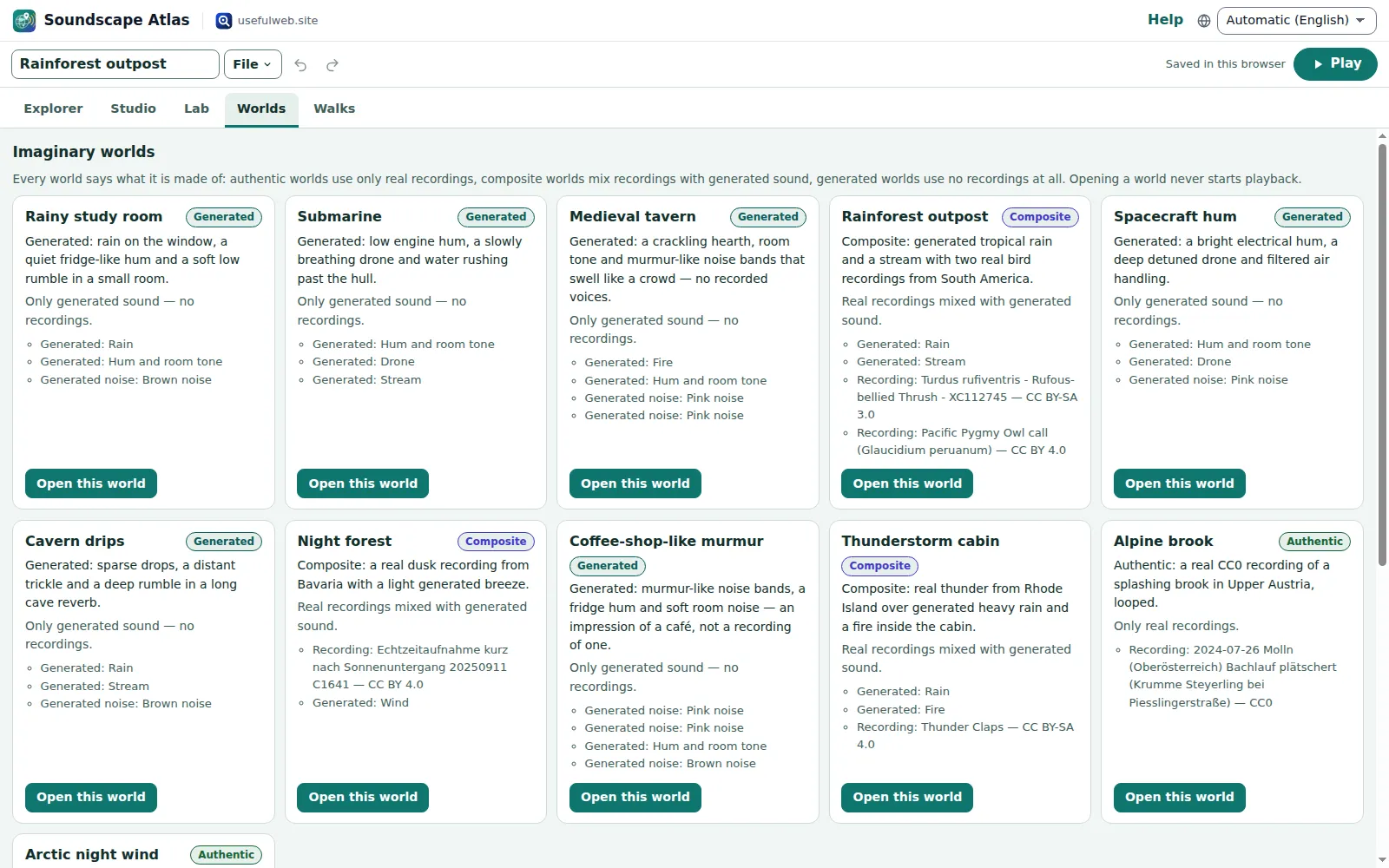 Imaginary worlds, honestly labelled
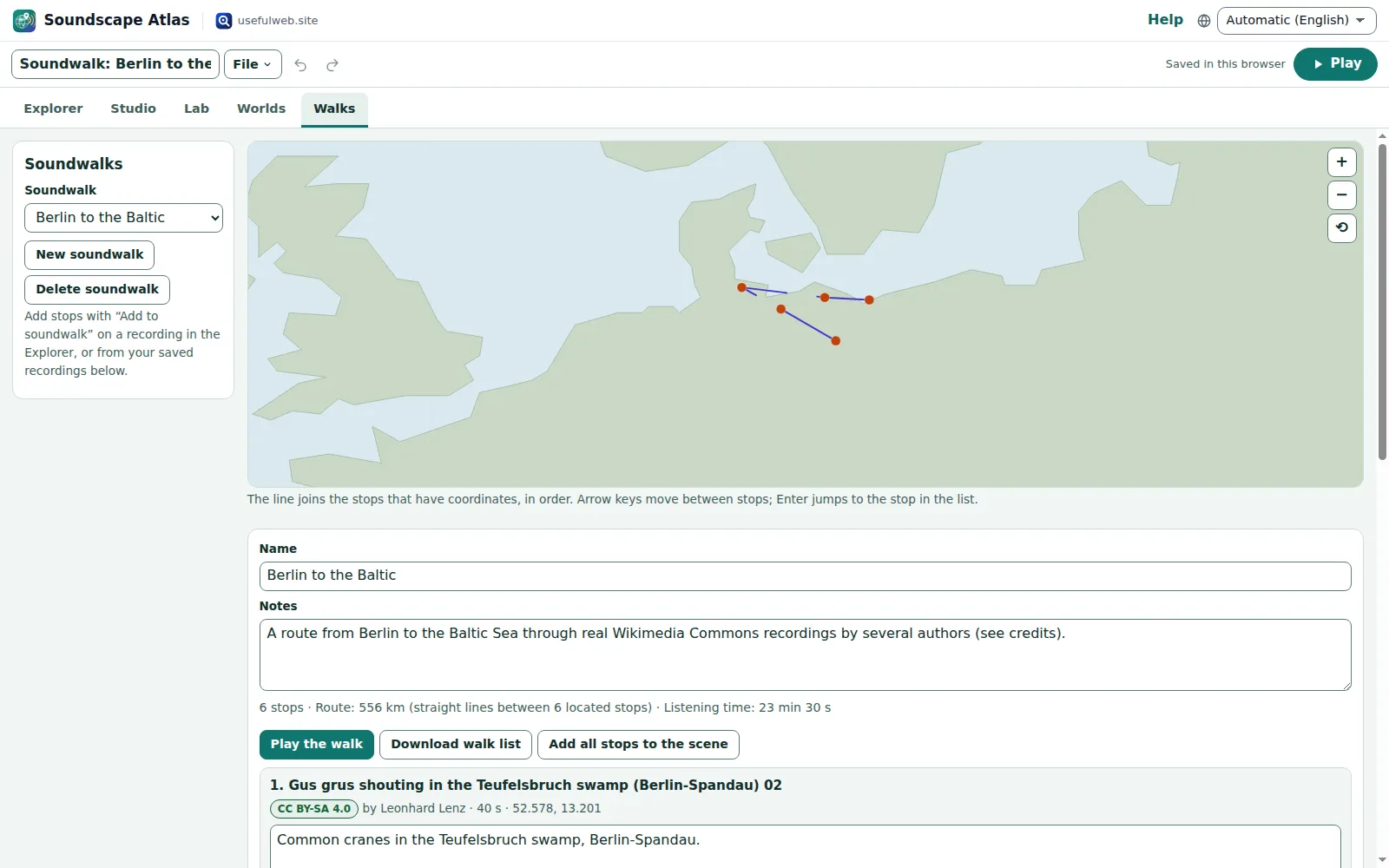 Soundwalks along real recordings
Features
Earth Explorer
An offline world map with pins for real geotagged recordings from Wikimedia Commons. Search by region, map point, sound category or words; a list view mirrors every pin.
Licences you can trust
Every recording shows its licence, author and source link. Only CC0, public domain, CC BY and CC BY-SA recordings can go into a scene; others are marked and stay out.
Attribution built in
Each recording carries a ready attribution line, and every export comes with a credits file that lists exactly the recordings you used.
Ambience Studio
Up to 16 layers with volume, pan, loop, mute and solo, fade-in and fade-out, filters and a start time — recordings and generated sounds side by side.
Generated weather and machines
Rain, wind, stream, fire, hum, drone and five noise colours, synthesized on your device from a seed, so a scene sounds the same every time.
Slow automation
Draw intensity curves over minutes — rain that swells and calms, a drone that breathes — and hear the same curve in playback and export.
Room and sleep timer
Place the scene in a room, hall, cathedral, cave or forest, and let a sleep timer fade everything out after the minutes you choose.
Procedural Sound Lab
Tweak a generator with sliders, listen to a live loop and read its spectrum, levels and slope from the same analysis the spectrum tool uses.
Imaginary worlds
Eleven ready scenes from a rainy study to a submarine and a medieval tavern, each labelled authentic, composite or generated.
Soundwalks
Put recordings in order along a route with notes, see the distance and listening time, and play the walk stop by stop.
WAV, MP3 and scene files
Render 15 seconds to 10 minutes as WAV in your browser, convert to MP3 with the site’s audio converter, or save the scene as an editable JSON file.
Share links without audio
A link carries the whole scene as references and parameters — recordings are fetched from Commons again, generated layers are rebuilt from their seeds.
Works with other apps
Bring loops from Tonegrid or clips from Reelcraft in as layers, and hand rendered ambiences or scene files to other premium apps.
Private by design
Projects autosave in this browser with recent projects, undo and redo. Your location is only used for one search when you press “Near me”.


Templates
Start from a ready-made project and change it to fit.
Rainy study room
Generated: rain on the window, a quiet fridge-like hum and a soft low rumble in a small room.
Submarine
Generated: low engine hum, a slowly breathing drone and water rushing past the hull.
Medieval tavern
Generated: a crackling hearth, room tone and murmur-like noise bands that swell like a crowd — no recorded voices.
Rainforest outpost
Composite: generated tropical rain and a stream with two real bird recordings from South America.
Spacecraft hum
Generated: a bright electrical hum, a deep detuned drone and filtered air handling.
Cavern drips
Generated: sparse drops, a distant trickle and a deep rumble in a long cave reverb.
Night forest
Composite: a real dusk recording from Bavaria with a light generated breeze.
Coffee-shop-like murmur
Generated: murmur-like noise bands, a fridge hum and soft room noise — an impression of a café, not a recording of one.
Thunderstorm cabin
Composite: real thunder from Rhode Island over generated heavy rain and a fire inside the cabin.
Alpine brook
Authentic: a real CC0 recording of a splashing brook in Upper Austria, looped.
Arctic night wind
Authentic: two real recordings — wind and snow at Abisko and a storm in a Swedish pine forest.
Soundwalk: Bourne Woods through the year
Five real morning recordings from one Lincolnshire wood, April to December, in calendar order.
Soundwalk: Berlin to the Baltic
Six real recordings from Berlin-Spandau to the coast: cranes, forest birds, a sparrow, town-hall bells, a goldfinch and a lighthouse.
Blank scene
An empty scene: add generated layers or recordings from the map.
Built-in tools
Soundscape Atlas uses these tools. Each one also has its own page and works on its own, in the browser, through the JSON API and through MCP.
- Soundscape Recording Search Soundscape Atlas engineFind real, freely licensed sound recordings by place, category and keywords.
- Ambience Generator (rain, wind, stream, fire, hum, drone) Soundscape Atlas engineSynthesize rain, wind, water, fire, room hum or a drone as a seamless-loop WAV.
- Noise Generator (white, pink, brown) Soundscape Atlas engineMake white, pink, brown, blue or violet noise as a WAV file and check its spectrum.
- Audio Spectrum Analyzer Soundscape Atlas engineUpload audio and see its spectrum, peak frequencies, centroid, RMS/peak and waveform.
- Room Reverb for WAV Files Soundscape Atlas engineAdd room, hall, cathedral or cave reverb to a WAV file with a known reverberation time.
- Universal Audio ConverterConvert MP3, WAV, FLAC, Ogg, Opus, M4A and AIFF with bitrate and sample-rate control.
For AI agents
Soundscape Atlas runs on a deterministic engine. The same functions are available as tools with a JSON API and MCP, so scripts and AI agents get exactly the results the app shows.
- Soundscape Recording Search – Find real, freely licensed sound recordings by place, category and keywords.
Tool page ·POST https://soundscape.usefulweb.app/api/v1/tools/soundscape-recording-search/calculate· MCPsoundscape_recording_search - Ambience Generator (rain, wind, stream, fire, hum, drone) – Synthesize rain, wind, water, fire, room hum or a drone as a seamless-loop WAV.
Tool page ·POST https://soundscape.usefulweb.app/api/v1/tools/soundscape-ambience-generator/calculate· MCPsoundscape_ambience_generator - Noise Generator (white, pink, brown) – Make white, pink, brown, blue or violet noise as a WAV file and check its spectrum.
Tool page ·POST https://soundscape.usefulweb.app/api/v1/tools/soundscape-noise-generator/calculate· MCPsoundscape_noise_generator - Audio Spectrum Analyzer – Upload audio and see its spectrum, peak frequencies, centroid, RMS/peak and waveform.
Tool page ·POST https://soundscape.usefulweb.app/api/v1/tools/soundscape-spectrum-analyzer/calculate· MCPsoundscape_spectrum_analyzer - Room Reverb for WAV Files – Add room, hall, cathedral or cave reverb to a WAV file with a known reverberation time.
Tool page ·POST https://soundscape.usefulweb.app/api/v1/tools/soundscape-reverb/calculate· MCPsoundscape_reverb - Universal Audio Converter – Convert MP3, WAV, FLAC, Ogg, Opus, M4A and AIFF with bitrate and sample-rate control.
Tool page ·POST https://soundscape.usefulweb.app/api/v1/tools/audio-converter/calculate· MCPaudio_converter
- MCP endpoint (Streamable HTTP):
https://soundscape.usefulweb.app/mcp - Project file format (JSON Schema): https://soundscape.usefulweb.app/project.schema.json
- OpenAPI description: /openapi.json · llms.txt · API & MCP
Build a project through the API, then open it in the app with a link to https://soundscape.usefulweb.app/app#project=<base64url JSON>.
Import & export
Import
- Soundscape Atlas scene (.soundscape.json)
- Share link (#project=)
- Audio from other apps (WAV, MP3, Ogg … via App Bridge or file)
Export
- WAV (16-bit stereo, 15 s – 10 min)
- MP3 (via the site’s audio converter)
- Credits and attribution (.txt)
- Soundscape Atlas scene (.soundscape.json)
- Share link
- Soundwalk list (.txt)
Keyboard shortcuts
| Keys | Action |
|---|---|
| Space | Play or stop the scene (when no button has focus) |
| 1 … 5 | Switch to Explorer, Studio, Lab, Worlds or Walks |
| M | Mute or unmute the selected layer |
| S | Solo the selected layer |
| Arrow keys | Move the map selection between pins (map focused) |
| Ctrl + Z | Undo |
| Ctrl + Shift + Z | Redo |
| Ctrl + S | Save scene file |
| Ctrl + O | Open scene file |
| ? | Show keyboard shortcuts (single-key shortcuts can be switched off there) |
Frequently asked questions
Where do the recordings come from?
From Wikimedia Commons, the free media archive behind Wikipedia. Soundscape Atlas searches it through the public MediaWiki API and plays the files directly from upload.wikimedia.org. It does not host or copy any recordings.
May I use the recordings in my own videos or projects?
Scenes only use CC0, public domain, CC BY and CC BY-SA recordings. CC BY and CC BY-SA require attribution — the export includes a credits file with the lines — and a mix that contains a CC BY-SA recording must be shared under CC BY-SA as well. Check the file page before you publish.
Are the generated sounds real recordings?
No. Rain, wind, stream, fire, hum, drone and noise layers are synthesized on your device from a seed. Every world is labelled authentic (only recordings), composite (recordings and generated layers) or generated (no recordings at all).
Why is there no recording where I clicked?
Only a small share of Commons recordings has coordinates, and some regions have none at all. Widen the radius, choose a region or try another category; the search only shows what Commons actually has.
Will it start playing by itself?
No. Sound only starts when you press Play or a preview button. Opening a template, link or recording never plays anything.
Does the app know where I am?
Only if you press “Near me”. The browser then asks for permission, the position is rounded to about one kilometre and sent to Wikimedia Commons as part of that one search. It is not saved in the project, and searches around a point are never cached on the server.
Why can some recordings not be included in the WAV export?
The export decodes recordings in your browser. If a file cannot be fetched or decoded (offline, removed from Commons, or a format your browser cannot read), the export leaves that layer out and tells you which one.
Where are my scenes stored?
In this browser (IndexedDB), listed under Recent projects. Save a .soundscape.json file or a share link to keep or move a copy. Signed-in users can also save to Google Drive.
Limitations
What Soundscape Atlas does not do (yet):
- Recordings come only from Wikimedia Commons; their availability, coordinates and metadata depend on Commons and can change or disappear.
- Licence and author data are copied from Commons as published and can be incomplete; the app does not verify them and you must check the file page before publishing.
- Sound category tags are a keyword guess from titles, descriptions and categories and can be wrong.
- Search results depend on Commons search; very large regions may be slow, and Commons sometimes answers “busy” — try again after a minute.
- Generated layers are physically motivated synthesis, not recordings; the murmur in café and tavern worlds is filtered noise, not real voices.
- WAV export is limited to 10 minutes and needs the recordings to be decodable in your browser; imported audio from other apps stays in this browser and is not part of share links.
- Ogg/Opus originals do not play in every browser; the app falls back to Wikimedia’s MP3 transcode when there is one.
- Playback timing follows your browser’s audio clock and may pause in background tabs on some phones.
Tutorials
Learn Soundscape Atlas step by step.
- Find real field recordings on the world mapSearch Wikimedia Commons by region, map point, sound category and words in the Earth Explorer, listen to a recording and check its licence.Beginner 6 min
- Mix your first ambienceBuild a scene in the Ambience Studio from generated rain, wind and water plus real recordings, with volume, pan, loops, mute and solo.Beginner 7 min
- Slow automation, rooms and the sleep timerLet layers swell and calm down over minutes with automation curves, place the scene in a room and fade everything out with the sleep timer.Intermediate 6 min
- Imaginary worlds and the Procedural Sound LabOpen a ready-made world, understand authentic, composite and generated scenes, and shape a generator in the Sound Lab with its spectrum.Beginner 6 min
- Soundwalks along real recordingsPut recordings in order along a route with notes, see distance and listening time on the map, play the walk and export the list with credits.Beginner 5 min
- Export, credits and sharingRender a WAV or MP3 of your scene, keep the attribution with it, share a link without audio and hand audio to and from other apps.Intermediate 6 min
Ready to try it?
Other premium apps
-

Twinworks
Factory digital twin & production simulation
Model a production line, simulate it and find the bottleneck — free, in your browser.
-

Lumina
Photo editor & image toolkit
Bring out what you saw. A free photo studio, right in your browser.
-

Kerfwise
Cabinet & furniture CAD
Design cabinets and furniture, get cut lists, optimised sheet layouts, costs and drawings.
-

Kinetica
Robot motion studio
Simulate robot arms in your browser: kinematics, trajectories, collisions, program export.
-

Flipline
Drawing, storyboards & animation
A few drawings. A little life. Make a flipbook in your browser.
-

Ohmforge
Virtual electronics workbench
Draw a circuit, switch it on, and measure it with real-feeling bench instruments.
-

Threadsmith
Embroidery digitizing studio
Draw or import artwork, turn it into stitches, export DST, PES, JEF or EXP files.
-

RavingDesk
Paper trading & data workspace
Practise trading on paper and chart your data: orders, risk, datasets, analyses, reports.
-

Ledgerly
Household finance & life-admin desk
Budgets, bills, subscriptions, loans, contracts and deadlines on one private desk.
-

OBSCURIQ
OSINT case desk
Organize public-source research: cases, a research log, pivots and indicators.
-

Chainscope
Web3 investigation desk
Investigate transactions, bridges, contracts, DAOs and wallets in one case file.
-

Proofline
Math notebook
Solve, graph, test and visualise in one notebook — with data, findings and a report.
-

Tonegrid
Tone matrix & beat sequencer
Light up squares to build looping melodies and beats, then arrange them into songs.
-

Paperwell
Document studio: PDFs, OCR, redaction, forms & contract reading
Your paperwork in one dossier: PDF tools, OCR, redaction, forms and contract reading.
-

Hearth
Home & travel planner
Plan meals, chores, home care, a move and trips for your whole household in one place.
-

Keysmith
Crypto & secrets lab
Audit certificates, keys, TLS and passwords in one lab; secrets stay on your device.
-

Renderloom
3D scene & material studio
Shape a scene. Find its light. Keep every idea editable.
-

Provenance
Software supply-chain security desk
SBOMs, CVEs, containers and licences in one risk register — free, in your browser.
-

Agentlab
AI-agent & LLM workbench
Test an AI agent before release: permissions, traces, costs, citations and output checks.
-

Reelcraft
Audio, video & image batch studio
Audio, video & image batch studio: cut, convert, compress, subtitle, reframe
-

Signalhouse
Website & internet infrastructure inspector
Inspect DNS, TLS, mail, CDN and routing of all your domains — and see what changed.
-

Bundlekeep
Local project backup
Back up projects from every usefulweb app into one file, check it and restore any part.
-

Pageboard
Website inspiration boards
Collect website references, sort them with tags and arrange them on a moodboard.
-

Fieldday
Sports club & training organiser
Fixtures, brackets, ratings and training plans for your club — in one workspace.
-

Opsdeck
Developer & ops workbench
One deck for CI failures, cron, traces, k8s events, API diffs, query plans and Terraform.
-

Panelcraft
Comic books & figure references
Shape a page. Arrange a book. Give your story a voice.